
Download Lightski – AI‑Powered Data Analysis Tool for Secure, Fast Insights
Overview
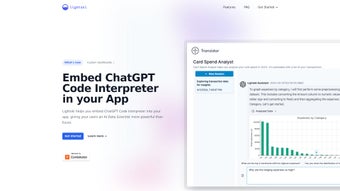
Lightski is an embedded AI data analysis platform that transforms the way modern applications handle analytics. By integrating a ChatGPT‑based Code Interpreter directly into the software stack, Lightski lets developers and product managers ask natural‑language questions and receive Python‑driven answers in real time. What sets Lightski apart is its relentless focus on data privacy: every query runs in an isolated execution environment, tied to a user‑specific mapping that guarantees no cross‑contamination of data. This architecture not only reduces false patterns caused by noisy datasets, but also empowers administrators to build custom dashboards without exposing raw data to third‑party services.
The tool is designed for SaaS platforms, internal enterprise portals, and any application that needs high‑end analytics without the overhead of a dedicated data‑science team. Lightski saves engineering time by automating schema transformations, generating code snippets on demand, and delivering actionable insights that can be embedded directly into the UI. The result is a smoother user experience, higher tier conversions, and a future‑proof analytics layer that can evolve alongside generative‑AI advancements. In addition, Lightski provides built‑in audit logging, role‑based access controls, and compliance‑ready reports that satisfy GDPR, HIPAA, and CCPA requirements, making it a trustworthy choice for regulated industries.
Whether you run a fintech dashboard, an e‑learning portal, a health‑tech solution, or a marketing automation suite, Lightski offers a secure, scalable, and AI‑enhanced way to turn raw data into meaningful visualizations. Its “plug‑and‑play” nature means you can start extracting value from your data within minutes of installation, while the underlying AI continuously learns from your specific schema to improve accuracy over time. By bridging the gap between complex SQL queries and everyday business questions, Lightski empowers non‑technical stakeholders to participate in data‑driven decision making without compromising security or performance.
Key Features & What Sets Lightski Apart
- ChatGPT‑Powered Code Interpreter: Ask natural‑language questions and receive Python code that runs instantly on your database, eliminating the need for manual query writing.
- Secure, Isolated Execution: Each query executes in a sandboxed Docker container with no external network access, preventing data leakage across users or services.
- User‑Specific Data Mapping: Permissions are enforced at the user level, ensuring that only authorized data is queried and that row‑level security is maintained automatically.
- Automatic Schema Transformation: Lightski can reshape your database schema on the fly to match the analytical needs of the query, handling joins, aggregations, and type conversions without developer intervention.
- Custom Dashboard Generation: Export results directly to visual components such as charts, tables, or KPI widgets, making it easy to embed insights into existing UI frameworks like React, Angular, or Vue.
- Low‑Code Integration: Minimal SDK integration steps for Windows, macOS, Linux, Android, and iOS platforms, with ready‑made wrappers for popular backend frameworks.
- Versioned AI Models: Stay up‑to‑date with the latest generative‑AI releases without manual re‑training; Lightski automatically rolls out model upgrades while preserving backward compatibility.
- Extensible Plugin System: Add custom Python libraries or third‑party analytics tools as needed, allowing you to tailor the environment to niche use cases such as time‑series forecasting or image analysis.
Pros
- Reduces engineering effort by automating repetitive data‑analysis tasks, freeing developers to focus on core product features.
- Maintains strict data privacy through user‑level isolation and encrypted sandbox environments, meeting stringent compliance standards.
- Fast insight generation—queries return results in seconds, enabling real‑time dashboards and rapid decision making.
- Scalable across small startups and large enterprises alike, with support for on‑premises, cloud, and containerized deployments.
- Future‑ready architecture that adopts new AI models automatically, ensuring the platform remains cutting‑edge without additional cost.
- Comprehensive documentation, sample projects, and an active community forum that accelerate onboarding.
Cons
- Initial learning curve for non‑technical users unfamiliar with natural‑language query formulation, though guided tutorials mitigate this.
- Requires a compatible Python runtime on the host server, which may add a minor setup step for legacy environments.
- Advanced customizations may need developer assistance, especially when integrating proprietary analytics libraries.
- Pricing model may be higher for very large data volumes, but tiered enterprise plans offer volume discounts.
- Offline usage is limited; a persistent internet connection is required for the latest AI model updates.
Overall Rating: 4.5/5 – Lightski delivers a powerful blend of AI‑driven analytics and enterprise‑grade security, making it a top choice for data‑intensive applications.
Installation, Usage Instructions & Compatibility
Installing Lightski is straightforward thanks to its cross‑platform SDKs. Follow these steps to get the tool up and running on your preferred operating system, and you’ll have a secure analytics engine ready in under ten minutes.
- Download the Installer: Visit the official Lightski website and choose the installer for Windows, macOS, Linux, Android, or iOS. The download is secured via HTTPS and verified with a SHA‑256 checksum, ensuring the package has not been tampered with.
- Run the Setup Wizard: On desktop platforms, the wizard guides you through prerequisite checks (Python 3.10+, required libraries, and Docker if you prefer container deployment) and configures the sandbox environment automatically. For mobile platforms, the SDK is delivered as a native library that integrates with your existing app project.
- Configure API Keys: After installation, generate an API token from the Lightski dashboard. Paste the token into the
lightski.config.jsonfile located in the application directory. This token authenticates your instance with the Lightski licensing server and enables model updates. - Connect to Your Database: Provide connection details (host, port, credentials). Lightski supports PostgreSQL, MySQL, MariaDB, SQLite, and cloud data warehouses such as Snowflake, BigQuery, Redshift, and Azure Synapse. Advanced users can also configure ODBC or JDBC connections for legacy systems.
- Start the Service: Execute
lightski startfrom the terminal (or use the mobile app’s start button). The service will launch a local endpoint (defaulthttp://localhost:8080) ready to receive queries. For production, you can run Lightski as a systemd service on Linux or as a Windows Service for continuous availability. - Verify the Installation: Open the Lightski web console at
http://localhost:8080/dashboardand run a sample query like “Show total sales for the last quarter.” If a JSON result appears, the installation is successful.
Using the AI Interpreter: Once the service is active, open the Lightski web console or embed the JavaScript widget in your application. Type a question such as “What was the monthly churn rate for the last six months?” and Lightski will:
- Parse the request with the ChatGPT model, extracting intent and required data fields.
- Generate secure Python code that queries the connected database, applying any necessary joins or aggregations.
- Execute the code in an isolated container, guaranteeing that no external network calls are made.
- Return a JSON payload with results, ready for charting, further processing, or direct export to CSV.
Operating System Compatibility: Lightski is built on a platform‑agnostic core, supporting:
- Windows 10/11 (x64)
- macOS 12 Monterey and later (Intel & Apple Silicon)
- Linux distributions (Ubuntu 20.04+, Debian, Fedora, CentOS)
- Android 9+ (via the Lightski mobile SDK)
- iOS 13+ (via the Lightski iOS SDK)
For cloud deployments, Lightski can run inside Docker containers or Kubernetes pods, ensuring seamless scaling and consistent security isolation across environments. Detailed logs and audit trails are accessible via the admin dashboard, making compliance audits straightforward. If you encounter issues during installation, the built‑in diagnostics tool can automatically suggest missing dependencies or configuration mismatches, and the support portal provides step‑by‑step troubleshooting guides.
FAQ & Final Thoughts – Why Lightski Is the Smart Choice for Modern Analytics
Is Lightski free to try?
Yes, Lightski offers a 14‑day free trial with full feature access. You can sign up on the website, download the installer, and start evaluating without entering payment details.
How does Lightski ensure my data stays private?
Every query runs inside an isolated Docker sandbox that has no network access beyond the configured database. User‑specific mappings enforce row‑level security, and no data leaves the host environment unless you explicitly export it.
Can I use Lightski with cloud data warehouses?
Absolutely. Lightski supports Snowflake, BigQuery, Redshift, and Azure Synapse out of the box. You just provide the connection string and appropriate credentials, and the AI interpreter handles the rest.
Do I need a data‑science background to use Lightski?
No. Lightski’s natural‑language interface is built for product managers, marketers, and analysts who may not write code. The system translates plain English into secure Python scripts automatically.
What kind of support is available after purchase?
All paid plans include email support, a dedicated Slack channel, and access to the knowledge base. Enterprise customers receive 24/7 phone support and a personal onboarding engineer.
How often does Lightski receive updates?
Lightski follows a continuous delivery model, pushing minor security patches weekly and major feature releases every quarter. Model updates are applied automatically without downtime.
Conclusion
Lightski bridges the gap between powerful AI analytics and stringent data‑privacy requirements. Its seamless integration, multi‑platform support, and ability to generate actionable insights with a single query make it a compelling addition to any data‑driven product. By offloading repetitive analysis to an intelligent, sandboxed engine, teams can focus on building features that truly differentiate their offering. The combination of rapid insight generation, robust security, and future‑ready AI models means you can confidently scale your analytics stack as your business grows. If you’re looking to boost user engagement, accelerate higher‑tier conversions, and future‑proof your analytics infrastructure, Lightski is the tool to download today.
Download Lightski now and experience secure, AI‑enhanced analytics that scale with your business.






